CSVF2 RADIO MODEM
CSVF stands for client server via frequency. Send text and files over a voice radio as audio tones, receive them again, and identify with your callsign spoken in NATO phonetics or sent in Morse code. Current version: 3.6.3 (released 2026-10-17 08:00 CDT).
Made by Reed Gabriel (KE9GDP). Licence: Creative Commons BY-NC-SA 4.0: you may share and change it, non-commercially and under the same licence, and you must give credit to the original author in a reasonable, easy-to-see way (not fine print): anyone using your copy should know it was originally made by Reed Gabriel (KE9GDP).
Download
Windows desktop app: the window, the automatic server, the modem, the spoken-callsign clips and
website.wav. Two ways to run it: the Python version (recommended, the
reference) or the exe (no Python needed). Both need a free ke9gdp.com account, which the
program asks you to sign up for or log into the first time it starts.
How to run it: Python version
- Unzip
csvf2.zipto a folder you keep (for example in Documents). - Install Python 3.10 or newer from python.org (tick "Add python.exe to PATH"; the tkinter window toolkit comes with it).
- In a terminal, in that folder:
pip install -r requirements.txt(that installsnumpy,scipyandsounddevice). - Double-click
CSVF2.pyw-- that is the real program: the window opens with no console window behind it, and the CSVF2 logo shows for 3 seconds. (Runningpython radio_gui.pydoes the same but leaves a console open.) - Updates: the "Check for updates now" button (Settings tab) downloads the new version, checks its
checksum, replaces the program files (the old ones go to
update_backup) and asks you to restart. Your settings, document texts and audio clips are left alone.
How to run it: exe version
- Unzip
csvf2-exe.zipto a folder you keep. Keep the wholeCSVF2folder together:CSVF2.exeneeds the files and folders next to it, so do not move the exe out of it (a shortcut to it is fine). - Double-click
CSVF2.exe. No Python and no installing. The first start can take a few seconds. Windows may warn about an unknown publisher because the exe is not signed: choose "More info", then "Run anyway". - Updates (v3.4.4 and newer): the "Check for updates now" button (Settings tab) downloads
csvf2-exe.zip, checks its checksum, closes the program, replaces the files and starts it again by itself. Your settings, document texts and audio clips are left alone, and the old program files are kept inupdate_backup. Older exe versions cannot do this: download the new zip and unzip it over the old folder once. - Servers as exes (v3.6.1): the same folder also has
CSVF2-Server.exe(ping and pong, and a document),CSVF2-Server25.exe(the same plus ChatGPT, Google and social posts),CSVF2-Echo.exe(Server 2.0 echo) andCSVF2-Web.exe(a Server 2.0 web site; its pages are in thewwwfolder). Double-click one: it is its own window, it listens by itself, and its settings are kept next to it. They are not signed either. - The exe is the same program compiled to C and built with MSVC; it has not been run over the air yet, so if something behaves differently from the Python version, tell me with the Feedback button.
Versions the Python version is developed and tested with: Python 3.12.4, numpy 2.1.0,
scipy 1.16.2, sounddevice 0.5.2, tkinter 8.6, on Windows 10. Other recent versions should work (numpy 1.24+
or 2.x, scipy 1.10+, any sounddevice 0.4+) but I have not tried them. Python 3.10 and 3.11 are untested too.
The two server scripts are started with python radio_server_template.py or
python radio_server_25.py (they have no .pyw: you want their log window's
console output anyway).
The first time you run it, the program asks you to accept the privacy policy: it sends the callsign you enter, once, to the public CSVF2 users list on this site, and nothing else about you. If you do not accept, it closes.
What it does
- Transmit tab: a Text / File switch, your callsign (spoken, or in Morse code), and the time the transmission will take on air. Transmit plays it to the sound device wired to your radio, or Save WAV writes it to a file.
- Receive tab: listens to the radio's audio, shows a level meter, and prints each message. It works out by itself which speed the sender used, and whether it is text or a file.
- When a file finishes arriving, a save prompt opens by itself with the sender's file name.
- Server tab: send text or a file to a server under an 8-character path, then listen for the answer. See "Talking to a server" below.
- Settings tab (new in v2.4): the radio and sound settings (output device and level, PTT lead-in, VOX keying tone) and the speed and reliability settings (Speed, Error correction, gap between bursts, radio time-out) in one place. The other tabs and both server scripts use the same ones. It also has the version, a Check for updates button and the privacy policy (new in v2.5), and a Show old modes box (new in v2.6, see Speeds).
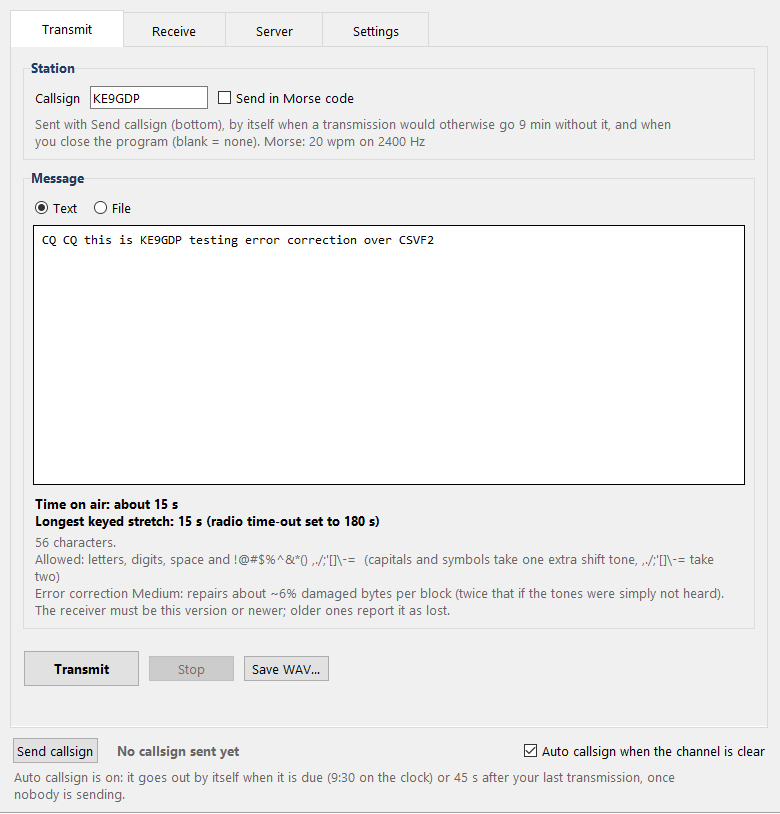
Transmit tab.
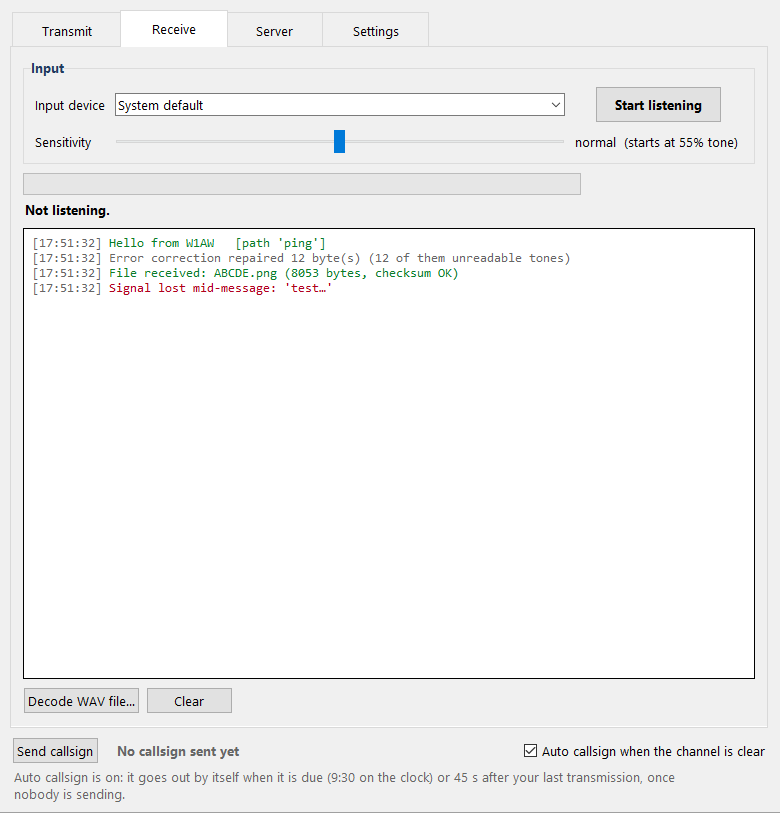
Receive tab (example log: green = checksum OK, red = garbled reception).
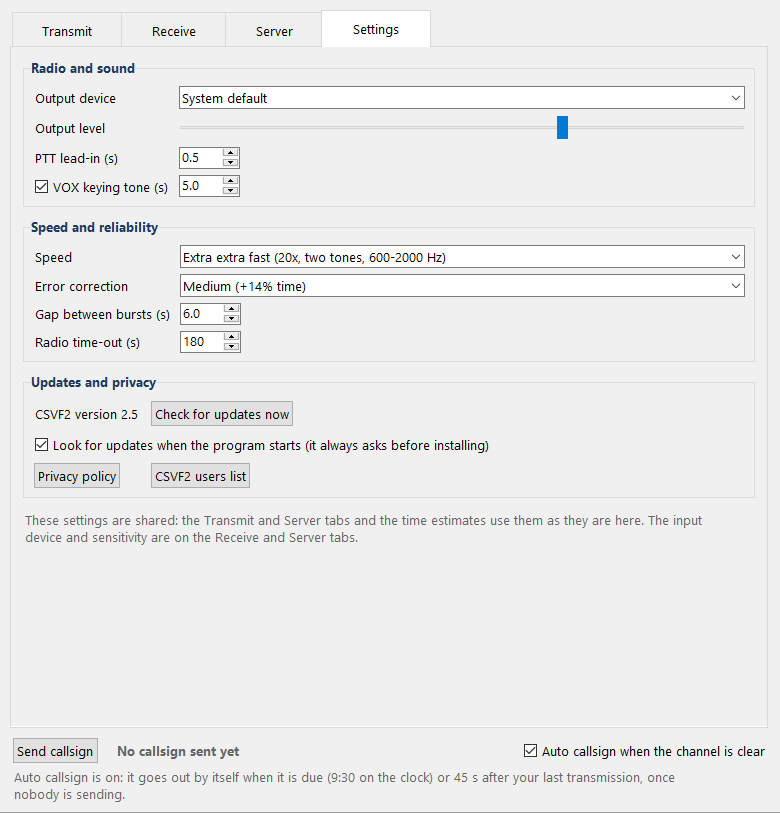
Settings tab.
Example: a picture over the radio
This picture, ABCDE.png (55 x 64 pixels, 8,053 bytes), was sent over the radio with
CSVF2 at Fast speed in 16 minutes. As tones that is 12,927 of them, sent in 8 bursts of about 2 minutes.

ABCDE.png, shown enlarged. Download the file
Biggest file sent so far
forest.png (650 x 544 pixels, 145,681 bytes, about 143 KB) -- sent over the radio with CSVF2 at
Extra extra extra fast (new) with Medium error correction, in about
40 minutes, and received with its checksum OK. It is the biggest file so far,
and the first over-the-air result for Extra extra extra fast (new). Everything arrived fine, so the error
correction turned out not to be needed this time; it stays on as insurance, at a cost of some speed.

forest.png, as received. Download the file
The record before it was 65.mp4 (about 65 KB) -- sent at Extra extra fast
with Low error correction, and received with its checksum OK. It was the
first over-the-air result for both Extra extra fast and Error correction.
65.mp4, as received. Download the file
The record before that was skull_and_roses.png (128 x 128 pixels, 26,157 bytes), sent at
Extra fast speed in about 20 minutes. As tones that is 41,909 of them, sent in 9 bursts of about
2 minutes, with the callsign spoken 4 times along the way.
skull_and_roses.png. Download the file
Tones
Every character or piece of data is one audio tone at a time (single-tone MFSK), except at Extra fast, which uses two at a time (see below). There are 37 data tones, then three control tones:
tone  0..25   q w e r t y u i o p a s d f g h j k l z x c v b n m
tone 26..35   1 2 3 4 5 6 7 8 9 0
tone 36       space
tone 37       SHIFT   (makes the NEXT tone a capital, or a symbol)
tone 38       END
tone 39       SYNC
Shift works like the key on a keyboard, for one tone only. Shift + a letter is
the capital. Shift + a digit is its symbol: 1 2 3 4 5 6 7 8 9 0 become
! @ # $ % ^ & * ( ). So Hi! is SHIFT h i SHIFT 1. A capital or
symbol costs one extra tone. Two shifts in a row (new in v2.3) select a second layer:
SHIFT SHIFT then a digit gives , . / ; ' [ ] \ - = (digits 1 2 3 4 5 6 7 8 9 0
in that order), three tones for one character. No new tone is used; older versions show those ten
characters as ?.
The tone spacing is exactly 1 divided by the symbol time, so the tones are orthogonal: the receiver can tell them apart even when they are only a few Hz apart. That is why a shorter symbol needs wider spacing.
Extra fast makes each tone 25 ms long, so the tones have to be 40 Hz apart, and only 15 of them fit between 560 and 1120 Hz: too few for 40 characters. So each character is sent as a pair of tones played together, 80 to 200 Hz apart, and every character has its own pair. The tone numbers above, the shift rule, the checksums and the bursts are all exactly the same; only the sound of each tone changes.
Speeds
| Fast (default) | Extra fast | Normal | |
|---|---|---|---|
| One tone lasts | 66.7 ms | 25 ms | 200 ms |
| Tones per second | 15 | 40 (pairs) | 5 |
| Tone spacing | 15 Hz | 40 Hz | 5 Hz |
| Data tones | 555 - 1095 Hz | 560 - 1120 Hz (two at once) | 550 - 730 Hz |
| SHIFT / END / SYNC | 1110 / 1125 / 1140 Hz | tone pairs | 735 / 740 / 745 Hz |
| Text | 15 characters/s | 40 characters/s | 5 characters/s |
| Files | about 9.4 bytes/s | 25 bytes/s | about 3.1 bytes/s |
| 1 KB file | 1 min 49 s | 40 s | 5 min 27 s |
| 10,000 byte file | about 18 min | about 7 min | about 54 min |
| Usual largest file (a warning, not a limit) | 10,000 bytes | 100,000 bytes (about 67 min) | 10,000 bytes |
| Frequency error it can take | about 3 Hz | about 3 Hz | about 1.5 Hz |
The faster modes, which need a cleaner audio path (a wider band, or tones that overlap a little):
| Extra extra fast | Extra extra extra fast (new) | Amplitude extra fast | |
|---|---|---|---|
| One tone lasts | 10 ms | 10 ms | 25 ms |
| Tones per second | 100 (pairs) | 100 (pairs) | 40 (pairs) |
| Tone spacing | 100 Hz | 50 Hz | 40 Hz |
| Data tones | 600 - 2000 Hz (two at once) | 600 - 2000 Hz (two at once, 29 tones, 64 pairs) | 560 - 1120 Hz (two at once, unequal) |
| SHIFT / END / SYNC | tone pairs | tone pairs | tone pairs (own SYNC) |
| Text | 100 characters/s | 100 characters/s | 40 characters/s |
| Files | 62.5 bytes/s | about 74 bytes/s (6 bits a tone pair) | 35 bytes/s (experimental) |
| 1 KB file | about 16 s | about 14 s | about 30 s |
| 10,000 byte file | about 2 min 40 s | about 2 min 15 s | about 5 min |
| Usual largest file (a warning, not a limit) | 100,000 bytes (about 27 min) | 100,000 bytes (about 22 min) | 100,000 bytes |
| Frequency error it can take | about 8 Hz | at least 8 Hz (simulated) | about 3 Hz |
The slower modes (new in v2.9), for weak, noisy or fading signals. Both are Normal with longer tones, so each tone collects more energy and the receiver scores it against its own band only. The receiver must be v2.9 or newer, and the sender should switch on error correction as well:
| Slow | Super slow | Slowest (v3.0) | |
|---|---|---|---|
| One tone lasts | 400 ms | 800 ms | 1.6 s |
| Tones per second | 2.5 | 1.25 | 0.625 |
| Tone spacing | 2.5 Hz | 1.25 Hz | 0.625 Hz |
| Data tones | 1200 - 1288 Hz | 1400 - 1444 Hz | 1600 - 1622 Hz |
| SHIFT / END / SYNC | 1292.5 / 1295 / 1297.5 Hz | 1446.25 / 1447.5 / 1448.75 Hz | 1623.1 / 1623.75 / 1624.4 Hz |
| Text | 2.5 characters/s | 1.25 characters/s | 0.6 characters/s |
| Files | about 1.6 bytes/s | about 0.8 bytes/s | about 0.4 bytes/s |
| 1 KB file | about 11 min | about 22 min | about 44 min |
| Usual largest file (a warning, not a limit) | 5,000 bytes (about 53 min) | 2,000 bytes (about 43 min) | 1,000 bytes (about 43 min) |
| In simulation, a short text still arrived at | -12 dB signal to noise | -15 dB signal to noise | -18 dB signal to noise |
The last row is a computer simulation (white noise in a 300 - 3000 Hz band; Normal stopped working between 0 and +3 dB in the same test). It is not a measured radio sensitivity: nothing has been tried over the air yet.
Fast is 3x quicker in total, not just for the data: the start marker, type tone and end tone shrink too. Normal keeps every tone between 550 and 745 Hz. The receiver listens for both at once, so the receiving side never needs a setting.
Extra fast is 8x Normal (2.7x Fast) and stays inside Fast's frequency range. It needs a slightly cleaner signal than Fast (in simulation, about 1 to 2 dB more). A 100,000 byte file is about 74 minutes on the air once the pauses and callsigns are counted. The times in the table count the tones only. Extra fast is new in v1.9. The first version of it did not receive on a real FM link; it was redesigned after that test, and the redesigned one has since been confirmed working over the air on analog FM.
Extra extra fast (new in v2.4) is Extra fast with 10 ms tones instead of 25 ms: the same pairs of tones, the same start marker and framing, but 100 tones a second, so files go 2.5x faster than Extra fast (62.5 bytes a second, about 27 minutes for 100,000 bytes) and text 100 characters a second. It uses plain frequency coding, no loudness, which is why it is built this way rather than on top of Amplitude extra fast. The price is bandwidth: a shorter tone needs wider spacing to stay clean, so its 15 tones are 100 Hz apart from 600 to 2000 Hz instead of 40 Hz apart from 560 to 1120 Hz. In my simulated channel it decoded as far down in noise as Extra fast (about 2 dB signal-to-noise) and survived the same abuse: a hard limiter, pre-emphasis, clock errors of 1000 ppm, a frequency shift of 8 Hz, and speaker and microphone roll-offs of up to 18 dB per octave. Its weak spot is a steeply tilted level across the band, where a weak tone next to a much louder one gets swamped (a smooth tilt of 9 dB per octave is its limit). First over-the-air result: a 65 KB file (65.mp4, see Biggest file sent so far) arrived with its checksum OK at this speed, with Low error correction. That is one test, so it may still need a radio with a clean audio path up to 2 kHz; tell me what yours does. Older versions do not hear it at all.
Amplitude extra fast (new in v2.3) is Extra fast with a second piece of information in every file symbol. The two tones of a pair are sent slightly unequal, and which one is louder, and by how much (four balances: +4, +1.3, -1.3, -4 dB), carries 2 more bits. Files go about 1.4x faster than Extra fast (35 bytes/s); text, the file header and the end tone are plain Extra fast, so text gains nothing. Every burst starts with its own start marker and about 1.2 s of calibration tones (all 40 pairs equal, then the four balances) so the receiver learns what the link does to them. It needs roughly 10 dB more signal-to-noise than Extra fast in simulation, and older versions do not hear it at all.
Experimental for files. In the first over-the-air tests, text at Amplitude extra fast was received reliably, but files failed often (a radio's limiter and level control change loudness, and the balance only partly survives them). A damaged file is reported as lost or as failing its checksum and is never saved as good. For files use Extra fast; use Amplitude extra fast for files only to experiment, and tell me what your radios do.
Extra extra extra fast (new) (new in v2.6) is Extra extra fast with more data in every tone pair. The symbols are the same 10 ms, but the tones are 50 Hz apart instead of 100 Hz, so there are 29 of them between 600 and 2000 Hz, and a file symbol picks one of 64 pairs (two banks of 32) instead of 32: 6 bits a symbol instead of 5. Files go about 74 bytes a second (1.2x Extra extra fast); text is the same speed as Extra extra fast. Tones that close overlap a little (a tone leaks 40% into the next 50 Hz slot), so the 64 pairs are picked to keep look-alikes out, and after a file is in the receiver decides it again with each pair's own average level. In my simulated channel it holds about 3 dB less noise than Extra extra fast (each extra bit costs roughly that) and passes the same abuse (hard limiter, clock errors, roll-offs, 6 dB per octave of tilt). First over-the-air result: a 143 KB picture (forest.png, see Biggest file sent so far) arrived with its checksum OK in about 40 minutes, with Medium error correction (which was not needed). That is one test, so tell me what your radio does. Older versions do not hear it at all.
Old modes (new in v2.6). Amplitude extra fast and the first Extra extra extra fast (6.67 ms tones, 150 Hz apart, below) are no longer in the Speed list. To use them, tick Show old modes on the Settings tab and accept the warning. Receiving needs no setting: every mode is always listened for.
Extra extra extra fast (old) (new in v2.6) was Extra extra fast shortened to 6.67 ms tones 150 Hz apart (600 to 2700 Hz): files about 94 bytes a second. Over the air it was not good. On the one radio I tried, the first test did not even start a frame; the second received the whole file but about 1 symbol in 38 was wrong even after the receiver's repairs (4% of the bytes: more than Low error correction can fix, so it needs Medium or High and gives back most of the speed). The recording showed why: that radio put loud low-frequency junk under the tones and sent the pairs at very unequal levels, so the weak ones lost. That is what led to the receiver re-deciding a file once it is in, and to the new design above.
Error correction (new in v2.4)
Until v2.4 the checksums could only detect damage: a transfer with a bad tone had to be sent again. The Error correction box (Settings tab, and both server scripts) adds a Reed-Solomon code, the same family of code QR codes use, so the receiver can repair damage up to a chosen amount. It works for text and for files at every speed, and the receiver needs no setting: it reads the level from the transmission.
| Level | Extra time on air (long messages) | Wrong tones it repairs | Gap it bridges (tones not heard at all) |
|---|---|---|---|
| Off | none | none | none |
| Low | +7% | about 3% of the message | about 6% |
| Medium | +14% | about 6% | about 13% |
| High | +34% | about 13% | about 25% |
| Maximum | +101% | about 25% | about 50% |
- How it works. The data is cut into blocks of up to 255 bytes and every block gets 16, 32, 64 or 128 parity bytes. The blocks are interleaved, so a stretch of lost tones is shared between them instead of overwhelming one. The receiver knows which tones it could not hear at all, and those are repaired at twice the rate of tones that arrived but were wrong, which is why a dropout or a fade is the case it handles best.
- Never a wrong file marked good. There is a second checksum inside. If a level's budget is exceeded, the message or file is shown as failed (red) exactly as before; a repair that cannot be completed is never saved as good.
- Short messages cost more than the percentages. A fixed length header and at least one block of parity are always sent, so a 20 character text goes from about 35 tones (the whole transmission, start marker included) to about 90 at Low, and a 200 character one from about 215 to about 310. The percentages are for long messages and files.
- The receiver must be v2.4 or newer. Older versions report a corrected transmission as lost, because it uses the extended frame format (the level rides in the scramble flag tone). With the box on Off, transmissions are byte for byte what v2.3 sent.
- After a repair the log says how many bytes were fixed and how many were unreadable tones. The servers log it too, and send every reply at the level set in their window.
First over-the-air result. The 65 KB file 65.mp4 (see Biggest file sent so far) was sent at Extra extra fast with Low error correction and arrived with its checksum OK; I do not know how much, if anything, the correction had to repair. Apart from that this has only been tested in simulation: the code itself at its exact limits, and whole transmissions at every speed and level through clean audio, band-passed noise, dropouts of 1 to 8 seconds and bursts of noise. At 1 dB signal-to-noise on plain band-passed noise, Off and Maximum both delivered 6 of 6 files in my test, so do not expect it to add range by itself; it is for dropouts, fades and bursts of interference, which is what a checksum could not help with. Tell me what your radios do.
What goes on the air
[KEY tone] [SYNC x11] [TYPE] [PATH x8] [ ...data... ] [END] [website.wav] [end tone]
PATH and the end tone are only in messages sent with the Server tab. Your callsign is sent with its own button (see Station ID), and goes into a transmission only when the 10 minute rule needs it. The automatic server scripts still put it at the start and the end of every reply.
- website.wav plays right after the last tone, with the first transmission and then
with every 10th one (new in v2.4; before that it played with every transmission that carried data).
The window and both server scripts count their own transmissions. Since v2.2 it is played
1.5x faster (about 7 seconds instead of 11), at the same pitch, so it still sounds like normal speech.
It is an ordinary audio file in
audio/: replace it with your own announcement. The receiver ignores it, like any other speech. - SYNC is a Barker-11 pattern. The receiver only starts decoding when it hears it, and it also gives the receiver its timing, so the spoken callsign is never mistaken for data.
- TYPE is the first tone after SYNC:
tfor text,ffor a file. Two more types,s(server text) andd(server file), are followed by an 8-tone PATH before the data. The checksum covers TYPE, PATH and data. - Text is one tone per character followed by a CRC-8 checksum (two tones).
- With error correction the text (packed 6 bits a character) or the file bytes, plus a CRC-32, are cut into Reed-Solomon blocks, interleaved, and sent in base 32 after a small length codeword, in an extended frame whose scramble flag tone also carries the level.
- Files are sent as the bytes
name length | name | size | content | CRC-32, in base 32: 32 of the data tones each carry 5 bits, so a byte takes 1.6 tones. Sending hex would take 2 tones a byte. The number of tones fixes the exact byte count, so no padding marker is needed.
Talking to a server (Server tab)
The Server tab is the client side of client and server on one frequency. It works like the Transmit and Receive tabs together and uses the same settings (they are the same settings: change one and the other tabs change too), plus one extra box. Looking for a server to talk to, or want to list your own? See the CSVF2 Server Map.
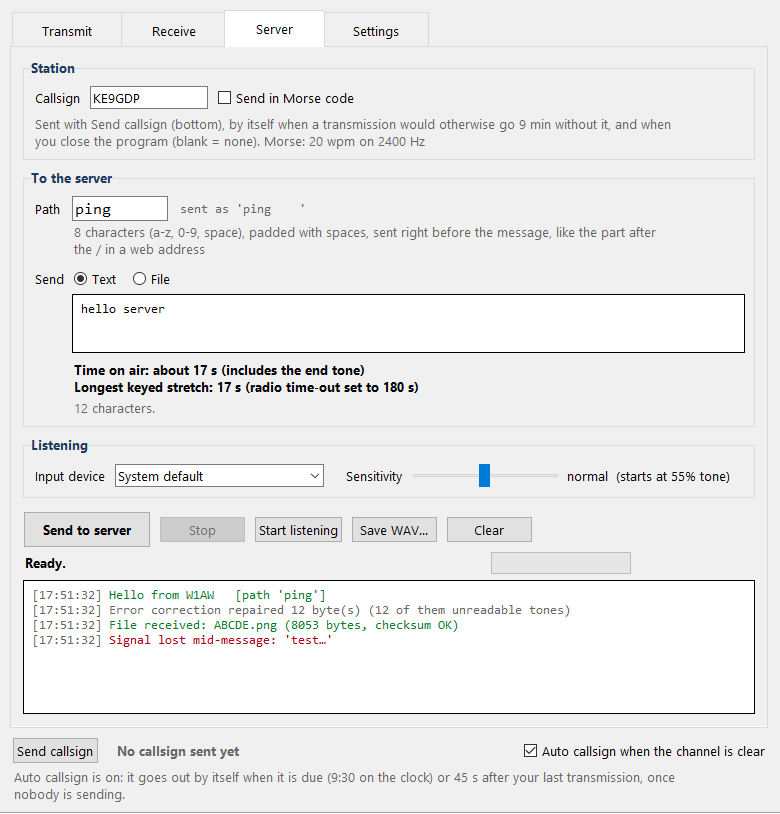
Server tab.
- Path. 8 characters (a-z, 0-9 and space, padded with spaces) that are sent right before the message, like the part after the / in a web address. The box lower-cases what you type and shows exactly what is sent. The receiver strips the trailing spaces.
- Send to server sends text or a file with that path. Right after the last tone of your transmission the tab is listening, so the answer is heard straight away. The microphone is opened while you send, but everything heard during your own transmission and for half a second after it is ignored. Anything that arrives is shown in this tab and in the Receive tab, and a file opens the same save prompt as before.
- End tone. At the very end, after website.wav, the Server tab sends a steady 450 Hz tone for 2 seconds. It is how the server knows you have finished (website.wav and everything else are done) and that it is its turn to answer, instead of guessing with a fixed 30 second wait. Like the 400 Hz VOX keying tone it is below every data tone, so it is never mistaken for data. The Transmit tab does not send it.
Server: automatic ping / pong, and your own commands
radio_server_template.py is a station that runs by itself. It listens all the time, and
when it hears the text ping it transmits pong; sent to the path
document, it sends document.txt's text back instead, as a plain message, not
a file. That is the first step toward client and server on one frequency.
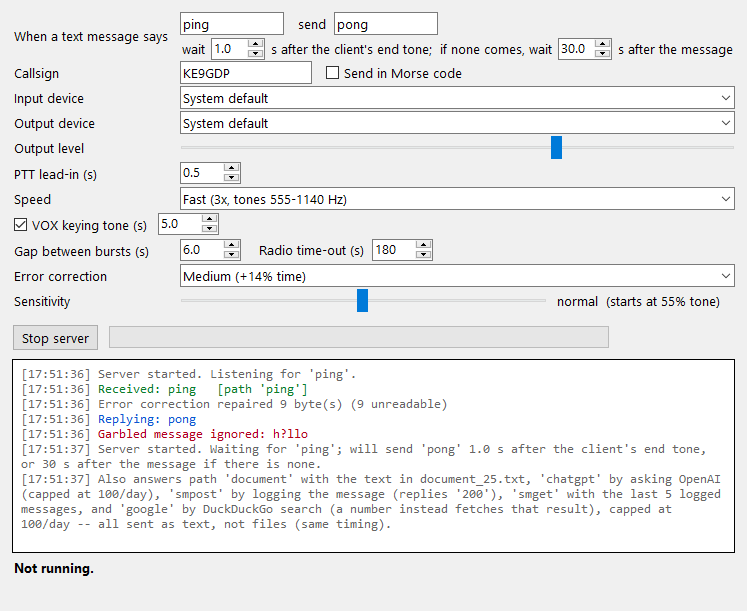
The server window.
- It is a template, not a fixed program.
radio_server_template.pyis meant to be copied and edited: add your own paths in itsroute_for()function and teachtransmit_reply()how to build each one's audio (another canned reply, another file, anything else you code up) to build your own CSVF2 server. - It has every setting of the main window (callsign and its Morse code option, both devices, output level, lead-in, speed,
VOX keying tone, gap between bursts, sensitivity) plus the text to wait for, the text to send back and
the reply timing. The settings are remembered in
radio_server.json. - Listening starts when the window opens. Only complete, checksum-passing text is answered, and
the match is the whole message ignoring capitals and spaces around it, so
Pingworks andhello pingdoes not. - Path "document". Any checksum-good message sent to this path is answered with
the text of
document.txt(next to the script -- replace it with your own), sent back as an ordinary message, not a file, whatever the message itself says. Only letters, digits, space and!@#$%^&*()survive the trip; anything else in the file is dropped and logged, not fatal. A missing document.txt just fails that one reply; the server keeps running. - When it replies. A message sent from the Server tab is held until the server hears that client's end tone, and then answered 1 second later (a setting), by which time the client is already listening. If no end tone comes (a message from the Transmit tab, an older version, or a tone lost in noise) the server answers 30 seconds after the message instead (also a setting), and says so in its log. The path is shown in the log.
- Replies go out one at a time, in order. Up to 5 can wait; more requests are ignored. The receiver is deaf while the server transmits and for 1.5 seconds afterwards, so it never answers itself.
- Each reply is a normal transmission, so it carries your callsign at the start and the end, the VOX keying tone and website.wav. Other text is just logged; files sent to the server are logged and ignored.
- It transmits unattended. Enter your callsign first: the server warns in its log if it is blank.
radio_server_25.py: a worked example (chatgpt, smpost, smget, google)
radio_server_25.py started as a copy of the template above and has since grown four
more paths, to show what building your own server on top of it looks like. It has the same window,
the same settings, and the same "document" idea -- just its own document_25.txt, a short
reference for these paths (not the path/end-tone mechanics already covered above).
- Path "chatgpt". Your message is sent to OpenAI (the
gpt-4o-minimodel) as a prompt, and its reply is sent back the same way, as text. This needs your own OpenAI account: set theOPENAI_API_KEYenvironment variable before starting the script (it is never written to a file here) and have a working internet connection. The request runs in the background, so the window and the receiver keep working while it is in flight, and nothing else is sent out while it waits. Capped at 100 calls a day (resets at midnight, local server time) -- past that, a fixed "limit reached" message is sent instead and OpenAI is not called, so it can't run away with your account. A missing key, no internet, or a bad response just fails that one reply; the server keeps running. - Path "smpost". Your message is added to a small local log (plain file, not a
real database) that keeps the 5 most recent posts, and the server replies with the text
200. - Path "smget". Replies with the up-to-5 most recent posts from that log,
numbered, oldest first, or
no posts yetif nothing has been posted. - Path "google". Anything you send that isn't a plain number is run as a
DuckDuckGo search, and the reply lists up to 5 results as
1 <title> 2 <title> .... Send back one of those numbers (as its own "google" message) and the server fetches that page and replies with up to 800 characters of its plain text. Numbers are only remembered from your most recent search. Like "chatgpt", this needs a working internet connection, runs in the background so nothing else is held up while it fetches, and is capped at 100 calls a day (a search and a fetch each count as one, tracked separately from the chatgpt cap) -- past that, a fixed "limit reached" message goes out instead. The search and the page-to-text conversion are both done here directly (no third-party API, no extra Python package), scraping DuckDuckGo's own results page, so it can break if that page's layout changes; a failed search or fetch just fails that one reply and is logged, same as a missing document.txt. - You are responsible for what goes out over the air here just as with any other transmission -- including whatever OpenAI's model happens to reply with, or whatever a page found by "google" happens to say. Nothing in this code reviews that content before it is sent.
Radios with a time-out (bursts and VOX)
Most radios cut the transmitter after a set time (the time-out timer), and a VOX radio takes about a second to key and clips the start of the audio. CSVF2 works around both. Set Radio time-out (on the Transmit and Server tabs, and in the server programs) to your radio's time-out timer, 30 to 600 seconds. It starts at 180. For a radio with no time-out at all, set it to 0 (off) (new in v3.1): the transmission is then sent in bursts of 8 minutes, so a long one still pauses for your callsign. Receivers before v3.1 cannot read such a transmission.
- Bursts. A long transmission is sent as bursts of tones. Between bursts the audio goes silent (6 seconds by default, the Gap between bursts setting) so the radio un-keys and its timer starts again. Each burst starts with a fresh SYNC. The receiver waits through the gap (up to 90 seconds) and carries on with the same file or message.
- Burst length follows the time-out. At the 180 second default the bursts are 2 minutes, exactly as in earlier versions. With any other time-out the sender picks the longest burst (5 to 185 seconds, in 5 second steps) that keeps every keyed stretch at least 5 seconds under it, and puts that length in a short extra header at the start, so the receiver knows where the gaps fall. For example, a 60 second time-out gives bursts of about 40 seconds. Receivers before v2.0 cannot read that extra header, so they only understand transmissions sent at the 180 second default.
- VOX keying tone. Every burst starts with a steady 400 Hz tone (5 seconds by default, the VOX keying tone setting). It is below every data tone, so the receiver ignores it, and it is what the VOX lag clips instead of your callsign or the SYNC. The same tone leads the whole transmission. It has its own checkbox: untick it (or set 0 seconds) if your radio is keyed some other way, such as a hardware PTT line. The gap between bursts stays either way.
- Longest keyed stretch. The Transmit tab shows the longest time the radio stays keyed without a gap (about 130 to 145 seconds with the defaults) and asks before sending if it comes within 5 seconds of the time-out that is set.
- Set the radio's VOX delay (hang time) to more than half a second and less than the gap between bursts, so it un-keys in every gap.
The pauses and keying tones add about 10% to the time on air.
Station ID
Built around the amateur rule that you identify at the end of a communication and at least every 10 minutes during one.
- New callsign mechanics (v2.7, the default). Your callsign goes out as a short
data frame at the start and again at the end of every transmission. Other CSVF2 programs show it
as "<callsign> is sending you a message" and, at the end, "has finished sending". The frame is
an ordinary server-text frame whose path is
idstart/idend(idalonefor the Send callsign button) and whose text is the callsign, so any receiver since v1.4 decodes it. In a transmission so long that 10 minutes would pass between callsigns it is also spoken (or sent in Morse) at the pause between bursts. Location (required to transmit): once you enter a location on the Settings tab, the same frame also carries your neighbourhood (an 8-character grid square, also called a Maidenhead locator, about 0.5 x 0.7 km; coarser if you choose) next to the callsign, so other programs can draw you on their Map tab: a red dot for you, a blue dot and a line for each station heard with a location, click a blue dot for its callsign. It goes out over the radio, so anyone who receives your signal can read it, it is not sent to this website, and it cannot be switched off (you choose how coarse it is). The exact format is on the protocol specification page. Choose Legacy on the Settings tab (Station ID) for the behaviour below, which is what v2.6 and earlier did. - Send callsign button (new in v2.2). Your callsign is no longer sent with every transmission. A bar under every tab has a Send callsign button and a timer of how long it has been since your last callsign. From 9:30 the timer flashes red until you send it. The clock starts at your last callsign, or at your first transmission after it if that came more than 10 minutes later (a new contact); with nothing sent since your last callsign it just shows how long ago that was.
- Never more than 9 minutes without it. If a transmission would take you past 9 minutes since your last callsign, the app puts the callsign into it by itself: at the start if it is already due, or at a pause between bursts in a long file, as before.
- When you close the program with anything sent since your last callsign, it sends your callsign first. It listens, and waits until the channel has been quiet for 2 seconds: no audio at all on the input (anyone talking, data, anything) and nothing being decoded, including the silent pauses inside someone else's long file. Then it sends the callsign and closes. Closing again while it waits asks whether to quit without it. With the squelch open, loud hiss can count as busy and keep it waiting, so keep the squelch closed.
- Auto callsign (new in v2.4). Tick Auto callsign when the channel is clear in the bar under every tab and the program sends your callsign by itself, but only when nobody is sending, you included: it listens, and waits until the channel has been quiet for 2 seconds. It goes out when the timer reaches 9:30, or 45 seconds after your last transmission with nothing heard or sent since (the end of a communication; 45 seconds is longer than a server's reply wait, so it does not talk over an answer). It needs a callsign entered and a working input device, and it does not repeat when nothing has been sent since the last callsign. With the squelch open, hiss can count as busy.
- The callsign is spoken letter by letter (NATO phonetics, digits as numbers) from the clips in
audio/. - Morse code instead (new in v2.1). Tick Send in Morse code next to the callsign
(Transmit tab, Server tab, and both server scripts) and the callsign goes out as CW instead of speech:
20 words per minute (the most FCC 97.119 allows for a CW ID) on a 2400 Hz tone (1500 Hz before v2.4: Extra extra
fast uses 1500 Hz for data now), above every data tone, so
the receiver ignores it just like the voice. Letters, digits and
/are sent; anything else is skipped and listed. The Send callsign button and the automatic ones use it too. - The automatic server scripts have nobody to press the button, so they still send the callsign at the start and the end of every reply.
- Over 10 minutes on air, the app asks before it transmits, and warns if no callsign is entered. With no callsign the pauses still happen, just without the voice.
You are responsible for operating within your licence and local rules, including for anything radio_server_25.py's "chatgpt" or "google" paths relay from a third-party service or web page.
Receiving
- Pick the sound input the radio is connected to, press Start listening, and set the radio's volume so the meter is strong but does not say CLIPPING.
- Text shows up as it arrives. Files show a percentage and time left.
- Sensitivity. The slider on the Receive tab sets how much of what the sound card hears has to be the start-of-message tones before the receiver starts a message. Normal (the middle) is 55%. Higher catches weaker signals; lower ignores everything but clean ones. Since v2.1 the slider runs from 80% at the left all the way to 1% at the right (it used to stop at 30%, which is now about three quarters of the way along); the Server tab's slider is the same one. In my simulated channel (band-passed white noise) Normal decoded down to about 0 dB signal-to-noise, and 30% down to about -6 dB at Fast speed (-3 dB at Normal speed), with no false starts on speech, the callsign clips or noise. Near the right-hand end it starts on plain noise: at 1%, a minute of simulated noise alone started well over a hundred false messages (all of them failed their checksum, so none was shown as good), and while it is busy with a false one it can miss the start of a real one. Use the far end only to dig out a weak signal you are watching for, not as a setting to leave on. It is a simulation, so treat those numbers as a guide, not a promise for your radio. The same slider sets how clearly the end tone (see below) has to be heard.
- A message or file that fails its checksum is shown in red. A damaged file asks "Save it anyway?" before the save prompt.
- The Decode WAV file button decodes a saved recording, including one made with Save WAV.
- The clock of the receiving sound card is tracked while a file comes in, so long transfers do not drift out of step. A gap of a few seconds in a file is survived (flagged as damaged); a longer one is reported as lost.
Limits and notes
- Characters that cannot be sent (anything other than letters, digits, space,
!@#$%^&*()and,./;'[]\-=) are skipped, and the app lists them. - There is no hard limit on file size any more (v2.3; the format's ceiling is 4 GB). The window warns for files over the usual size (10,000 bytes at Fast and Normal, 100,000 at Extra fast and Amplitude extra fast) and for audio that would need a lot of memory, and a receiver says when a large file arrives intact. Versions before v2.3 still refuse files over their own limit.
- Amplitude extra fast is experimental for files (see Speeds): use Extra fast for files that matter. It and the old Extra extra extra fast are hidden unless Show old modes is ticked.
- With error correction off, the checksums detect errors but do not repair them, and a damaged transfer has to be sent again. With it on (v2.4) damage up to the chosen level is repaired; beyond that the transfer is reported as failed. Error correction has been tried over the air once so far (see the Error correction panel).
- A file or message with a long run of the same byte or character (for example a file with a lot of zeros in it) is scrambled with a fixed pattern before it is sent, and unscrambled on arrival. A steady tone that lasts many seconds gives the receiver nothing to keep its timing on, so before v2.0 such files could slip and arrive damaged. Ordinary files are sent as before.
- A file bigger than the receiver accepts is now reported with its name, size and the limit, instead of just "signal lost". If that happens, check that the receiving program is up to date and was restarted after updating.
- Tones are close together, so the audio path must not shift frequency: fine for FM and for a sound-card link, not for a mistuned SSB radio.
- Keep the output level moderate so the radio does not clip the audio.
- Tested against simulated radio channels: a voice band-pass, added noise, clock error of +/-1000 ppm, clipping, dropouts, simulated VOX radios with 45 to 300 second time-outs, and transmissions of more than 18 minutes in bursts. That is not a promise about any particular radio and antenna.
Users list, privacy and updates (new in v2.5)
- Privacy policy. The first time the program runs it asks you to accept the privacy policy once. If you decline, it closes and sends nothing. After you accept, the first time it is used with a callsign it sends that callsign (in capitals) and the program version to this site, once for each callsign. Messages, files, audio, settings and your computer are never sent.
- CSVF2 users. The callsigns, with the time each was first seen, are on the public CSVF2 users page: the 10 most recent, and a button for the whole database. Callsigns are not verified, so a listed callsign only means a program was run with it. To have one removed, email the address on the main page.
- Updates. When the window starts it asks this site which version is newest (switch
that off on the Settings tab, or press Check for updates any time). If there is a newer one it
asks you; only on yes it downloads the zip, checks it against the SHA-256 this site
published, checks that every file in it is one the program knows and that the code compiles, copies the
files it replaces to an
update_backupfolder, and installs. Your settings, your document texts and your audio clips are never overwritten. You restart the program afterwards. The checksum comes from this site, so it guards against a damaged download, not against someone who has taken the site over: there is no code signing. - Servers. The server scripts ask the same privacy question the first time one is run and register their callsign when the server is started. Updating the window's folder updates them too.
- Location and map (new in v2.7). See the privacy policy: your neighbourhood can go out over the radio next to your callsign (required to transmit since v3.5.0; you choose how coarse it is) and is never sent to this site; the Map tab downloads street-map tiles from openstreetmap.org while it is open (switchable), which tells that server your address and the area you look at. Policy version 3, so the program asks you to accept it again once.
- Accounts and Feedback chat (new in v3.3). The program asks you to log in with a free
ke9gdp.com account when it starts. Sign up in the program or on the
account page: email, password and callsign, then
upload your licence (PDF, PNG or JPEG, exactly as issued, not edited). The site owner checks it by hand and
it is deleted as soon as the decision is made; only then is the account approved and the program usable.
The same account is used on the rest of ke9gdp.com. The Feedback tab is a private chat with the
author about feedback you sent, visible only to your account. An approved account works for 14 days
without the internet; the radio servers (
radio_server_*.py) do not ask for a login. See the privacy policy (version 6). - Server 2.0 (new in v3.2) — not tested over the air
yet. A tab next to Server for a TCP-style connection between two stations: you press
Connect (callsign and port) or tick Accept connections, and what you type or send arrives
complete and in order, with acknowledgements and automatic repeats of anything lost. One short segment goes
out at a time, so a conversation is slow by design. Nothing is sent until you connect, send or accept.
It has been tested only in simulation (modem audio and a lossy-channel model), never on a real radio, so
expect rough edges and please report what happens with the Feedback button. Both stations need v3.2;
older programs show a segment as a received file. See the
protocol page, section 12.
Other programs (new in v3.6.0): tick Let programs on this computer use the
connection and the tab opens a plain TCP port on
127.0.0.1(default 7373, this computer only; nothing else can connect). Everything the radio connection receives is sent to every program connected to it, and everything those programs write goes out over the radio on the open connection (it needs a location like any transmission; a program that writes while there is no open connection just waits). Trytelnet 127.0.0.1 7373. Off by default, and while it is on, any program on your computer can transmit through it. A second box serves a browser client (csvf2_client.html) athttp://127.0.0.1:7374/: type a station's callsign and a path and it asks that station's web server for the page over the radio and draws it as it arrives (no scripts, nothing from the internet). - Server 2.0 servers (new in v3.6.0).
radio_server2.pyis a base to copy for your own station;radio_server2_echo.pysends back whatever it hears (port 7);radio_server2_http.pyis a small web server on port 80 (no encryption, no scripts, no music: pages like /, /about, /time, /hello, /echo, /api/status, /guestbook and the files in itswwwfolder; audio and video are refused). Run them withpython radio_server2_echo.py/python radio_server2_http.py. - Guided tour (new in v3.0). The first time the program starts it offers a short, optional tour (strongly recommended): it switches tabs for you, greys out everything except the control it is explaining and circles that in red, with tips and tricks. Nothing is sent or played during it. The Tutorial button at the bottom of the window plays it again whenever you like.
- Icon (v3.0). The window and taskbar icon is the ke9gdp.com favicon (a copy ships with the program; nothing is downloaded for it).
- Compression (new in v3.0). The Settings tab has a Compression list after Error
correction: None; Lossless (exact: the text or file is packed with deflate, bzip2 or LZMA and
sent that way only when that makes the transmission shorter); and three Lossy levels (light, medium,
strong) that first simplify what is sent and then pack it: text gets tidier spacing, then lower case and
less punctuation, then no vowels in longer words ("hll evryn ths is ke9gdp"); images are scaled down and
their quality or colours reduced (needs the free
Pillowpackage,pip install pillow); WAV audio becomes mono, a lower sample rate and 8-bit. Other kinds of file are left as they are. The Transmit tab shows what will be sent and how much shorter it is. A lossy message arrives simplified; there is no way to get the original back. It is a convention inside an ordinary file frame (the file name gets.csvzadded), documented on the protocol page; programs older than v3.0 save it as a.csvzfile. Short messages are usually sent as they are, because the packed form carries about 17 bytes of header. - Direct messages (new in v2.8). On the Transmit tab, tick Direct message to and type a callsign. The text or file goes out as usual, labelled with that callsign. A receiving program whose own callsign matches shows it ("<callsign> is sending you a message"); every other program hides it and says "<callsign> sent a dm to somebody else". A message without the tick is announced as "is sending a public message". It is a label, not a secret: nothing is encrypted, the tones carry the content in the open and any radio can hear it, and the format is documented on the protocol page. Programs older than v2.8 show a direct message like a server message. Nothing new is sent to this site.
- Map keeps earlier positions (v2.8). A station heard from a new place keeps its earlier position on the map as a small pale dot (click it for the callsign and when); map tiles that failed to load are retried instead of staying blank at that zoom.
- Notifications (new in v2.7). The Notifications tab shows messages the site owner posted. When the program starts, now and then while it is open, and when you press Refresh, it asks this site for them (a plain request that carries nothing about you; switch the automatic part off with the same box as the update check).
- Feedback (new in v2.7). The Feedback button opens a form. Nothing is sent until you press Send; then the kind (bug, idea, other), your message and the program version are sent, plus a contact address and your callsign only if you add them. The site owner reads it on a private page; it is not published. The privacy policy has the details (it is version 3; the program asks you to accept it again once).
- Versions before v2.5 have none of this and cannot update themselves: download v2.5 once by hand.
Update log
Site - 2026-10-18 - New biggest file: forest.png, 143 KB
(650 x 544 pixels), sent over the radio at Extra extra extra fast (new) with Medium error correction in about
40 minutes, checksum OK, and no corrections needed. The earlier records (65.mp4, skull_and_roses.png) are kept
on the page. This is the first over-the-air result for Extra extra extra fast (new).
v3.6.3 - 2026-10-17 08:00 CDT - Servers: the server windows
(radio_server_template.py, radio_server_25.py and the Server 2.0 servers) now use the
callsign of the logged-in account, read-only, as the main window does (it was editable). The Server 2.0
servers also stop repeating the connecting station's callsign on every log line: it appears once per
exchange on the TCP segment line (with where it said it was); the plain template keeps its
"is sending a message" lines.
v3.6.2 - 2026-10-17 06:30 CDT - Server 2.0 fix, from the first real radio log: a server whose SYN+ACK never reached the client kept that half-open connection and then refused the client's second attempt, spending 21 s of airtime on a reset. A station has one connection at a time, so a new connection from the same station now replaces its old one, silently. Also, a server's first SYN+ACK was labelled a repeat and used up one of its tries; it no longer is. Both ends need no change to interoperate (the client side was already right).
v3.6.1 - 2026-10-17 04:30 CDT - Servers as exes: the exe download
now has CSVF2-Server.exe, CSVF2-Server25.exe, CSVF2-Echo.exe and
CSVF2-Web.exe beside CSVF2.exe, so a server can run without Python (the Python
version is unchanged). The exe's Update button installs them.
v3.6.0 - 2026-10-17 01:00 CDT - Other programs can use Server 2.0:
a new box on the Server 2.0 tab opens a TCP port on 127.0.0.1 (this computer only, off by default). What the
radio connection receives is sent to every connected program, and what they write is transmitted on the open
connection, so any program that can open a socket (or telnet) can use CSVF2.
Browser client: a second box serves csvf2_client.html on 127.0.0.1 that
connects to a station, requests its pages over the radio and draws them as they arrive.
New servers: radio_server2_echo.py (sends back what it hears) and
radio_server2_http.py (a small HTTP/1.0 web server with endpoints, a guestbook and a
www folder; no encryption, no music), both built on radio_server2.py.
Fix: several places did nothing without a location since v3.5.0 (Server 2.0 Connect, Accept
connections, Send, Auto callsign, closing the window); they now say what is missing and take you to the
Settings tab.
v3.5.0 - 2026-10-16 23:00 CDT - Location required to transmit: the program will not transmit (Transmit, Send callsign, the Server tabs) until you have entered a location (Settings tab), and it always goes out next to your callsign, so the window uses only the New callsign mechanics. You still choose how coarse it is. Receiving needs no location. This changes the privacy policy (now version 6), so the program asks you to accept it again once. Small screens: every tab scrolls (mouse wheel, Shift+wheel sideways, scroll bars that appear only when needed) and the window can be made much smaller. Lag while receiving: the receiver did about 40 times more arithmetic than needed and did it in the window's own thread, so a slow computer froze while listening. It now computes the same numbers with a sliding sum and decodes on a separate thread (the window only shows results). The exe update installs this.
v3.4.5 - 2026-10-16 21:15 CDT - Fix (exe): the exe build was missing part of the sound library, so it said to install sounddevice and could not listen or pick a sound device. It is now included. If the sound library still cannot load, the message shows the reason. Exe v3.4.4 can install this with its update button.
v3.4.4 - 2026-10-16 20:30 CDT - The exe updates itself: the Update button in the exe build downloads csvf2-exe.zip, checks its SHA-256, closes the program, copies the new files over the old ones (your document texts, settings and existing audio clips are kept; the old program files go to update_backup\previous) and starts it again. To get this, install v3.4.4 by hand once; v3.4.3 and older exes cannot do it. In the Python version the update box now says so when the files on disk were already current.
v3.4.3 - 2026-10-16 19:10 CDT - exe fixes: the icon is now built into CSVF2.exe (shortcuts and the pinned taskbar button no longer show a blank icon), and the exe finds its own files and libraries when started from a shortcut or another folder. Small code clean-ups.
v3.4.2 - 2026-10-15 19:36 CDT - Credit corrected: the author credit in the program, LICENSE.txt and on this site now reads Reed Gabriel (KE9GDP). The C source is no longer offered as a download (the exe is built from it; the Python is the reference).
v3.4.1 - 2026-10-15 17:30 CDT - Licence: CSVF2 is now under Creative Commons BY-NC-SA 4.0 (LICENSE.txt in every download). The credit to the original author, Reed Gabriel (KE9GDP), is shown at the bottom of every tab and in the window title, and must be kept. Time stamp: the window title and the Settings tab show the version with its build time. Fix: v3.4 still reported itself as 3.3.2, so it offered to update to itself; it now reports its real version.
v3.4 - 2026-10-15 - Three downloads: the same program as Python (recommended; updates itself), as C source and as a ready-built exe that needs no Python. The C is generated from the Python with Cython and the exe is that C compiled with MSVC; the Python is always the reference. The C and exe builds do not update themselves: download the new version here. The exe has been started and its modem round-trips a message in a check, but it has not been used over the air. Callsign: the Callsign box is now locked to the one on your account and cannot be edited.
v3.3.2 - 2026-10-12 - Fixes: tutorial boxes no longer run off the window or the screen (each box is fitted to the window, and its position was not being applied); the program's window is now fitted inside the screen when it opens, which at a high display scale used to put its bottom edge off the screen. Wording: the Maidenhead locator is now called a grid square in the program and on this site (the official name is still mentioned once).
v3.3.1 - 2026-10-12 - Fixes: the tutorial's grey layer now follows the window when you move it, and the window's Maximize and full-screen buttons work during the tutorial (it no longer holds the mouse; a nearly invisible layer blocks clicks on the highlighted controls instead). The licence upload no longer refuses files by type: it accepts any file up to 6 MB and the site owner reviews it by hand.
v3.3 - 2026-10-12 - Accounts. CSVF2 now needs a free ke9gdp.com account: sign up with an email, a password and your callsign, confirm the email, and send your licence exactly as issued; it is reviewed by hand, deleted once decided, and the account is then approved. The users list, server map and feedback all use the approved account's callsign, so a callsign can only act through the account approved for it. An approved account keeps working without the internet for 14 days. Feedback tab: a private chat with the author about feedback you sent, shown only to your account and fetched only when you open the tab or press Check for replies. Privacy policy version 5 (you are asked to accept it again). The website also rate-limits requests. Older programs can still use the radio, but not register a callsign or send feedback.
v3.2 - 2026-10-12 - Server 2.0: a new tab next to Server for TCP-style connections between two stations (handshake, numbered bytes, acknowledgements, repeats, closing). Warning: it has only been tested in simulation, not over the air. The server map now shows Server 1.0 and Server 2.0 stations in different colours.
v3.1 - 2026-10-12 - Radio time-out off: set Radio time-out to 0 to turn it off (instead of typing a huge number); long transmissions are then sent in 8 minute bursts so the callsign still goes out at least every 10 minutes. Both ends need v3.1 for such a transmission. Speed list is now ordered fastest to slowest (Fast is still the default).
v3.0.1 - 2026-10-11 - Fix: the taskbar icon. Started by
double-clicking CSVF2.pyw (above all with the Microsoft Store Python), Windows showed Python's icon
on the taskbar instead of the CSVF2 icon; the program now tells Windows its own identity and icon for the window.
Nothing else changed.
v3.0 - 2026-10-11 - Compression for text and files: a list on the
Settings tab with None, Lossless and three Lossy levels (simplified text, scaled images, lower-rate WAV audio),
used only when it makes the transmission shorter; the receiver unpacks it by itself. New speed
Slowest (1.6 s tones, 1/8 of Normal; in simulation still reads a short text at -18 dB signal to
noise). A guided tour (offered on first start, replayed with the Tutorial button) and the
site favicon as the window icon. Fix: Send callsign (and the callsign sent when the window closes) now goes out at the
speed chosen on the Settings tab instead of always at Fast. Slow modes use less processor time. Older programs do
not hear Slowest and save compressed files as .csvz.
v2.9 - 2026-10-11 - New speeds Slow (400 ms tones, half of Normal) and Super slow (800 ms tones, a quarter of Normal) for rough conditions. In simulation they decode a short text at -12 dB and -15 dB signal to noise, where Normal stops between 0 and +3 dB; files go at about 1.6 and 0.8 bytes per second. They use tones at 1200 and 1400 Hz, so older programs do not hear them at all. Not yet tried over the air.
v2.8 - 2026-10-11 - Direct messages: text or a file can be addressed
to a callsign (Transmit tab, Direct message to). Programs with a different callsign hide it and say
"<callsign> sent a dm to somebody else"; ordinary messages are announced as "is sending a public
message". Not encrypted, and documented on the
protocol page (address = dm plus six
characters made from the callsign, in the PATH). Map: a station heard from a new location keeps
its earlier positions as pale dots, and tiles that failed to load are retried.
v2.7 - 2026-10-11 - New callsign mechanics (default): the callsign is sent as a data frame at the start and the end of every transmission and receivers show "<callsign> is sending you a message" (Legacy mechanics stay available on the Settings tab). Feedback button in every tab (sent only when you press Send), a Notifications tab, dark mode (default) and a Sleek (default) or Legacy look on the Settings tab. The protocol specification page documents the whole on-air format. Location and Map: your neighbourhood (an 8-character grid square) is sent next to your callsign in those frames, switchable and on by default once you enter one; the new Map tab shows you as a red dot and the stations you hear as blue dots joined to you by lines (click one for its callsign). The privacy policy is version 3 (feedback, notifications, location and the map tiles), so the program asks you to accept it again once. The server scripts take the same callsign and location options.
v2.6 - 2026-10-11 - New speed Extra extra extra fast (new): Extra
extra fast's 10 ms symbols with the tones 50 Hz apart and 64 file pairs, 6 bits a symbol, about 74 bytes a
second (so far tested in simulation only). Old modes: Amplitude extra fast and the first
Extra extra extra fast (6.67 ms tones; poor over the air, see Speeds) are only listed when Show old
modes is ticked on the Settings tab, after a warning. Start-up: double-click
CSVF2.pyw to run the window with no console; the CSVF2 logo shows for 3 seconds; the window
hides its own console if it has one. Receiver: a file or corrected transmission is decided
again once it is all in, with each pair's score compared to that pair's own average on the link; a
transmission that stops and starts again at once is picked up from its new start instead of being read as
the old one's continuation; the first tones of a frame are chosen from the few valid ones; the receiver
ranks competing speeds by how well their tones scored. The Receive tab can show how close each speed came
to starting a frame and can save everything it hears to heard.wav for debugging. The updater
keeps a replaced csvf2.png logo.
v2.5 - 2026-10-10 - Privacy policy and users list: the program
asks you to accept a privacy policy once, then sends your callsign once to a public
CSVF2 users page (10 most recent, and the whole
database to download). Updater: the window looks for a newer version when it starts, asks
before installing, verifies the download, keeps a backup and never overwrites your settings, document texts or
clips. New radio_online.py (the only code that talks to this site). Older versions cannot update
themselves; download this one by hand.
v2.4.1 - 2026-10-10 - Receiver fixes found over the air at Extra extra fast. With the Sensitivity turned up, the receiver for another speed could start on the data of a file that was arriving and show random text, save-prompts for random files, or "heard what sounded like the start of a transmission" in the middle of it. The speed that is really receiving now takes priority, and anything whose tones hardly scored (speech, noise) is left unsaid. The status line said "Receiving file None" for a file sent with error correction, because its name is only known once everything is decoded; it now says so. A damaged tone that read as the end marker could stop a file early; a file now ends at its known length. The Biggest file record is now 65.mp4, about 65 KB, at Extra extra fast with Low error correction, checksum OK.
v2.4 - 2026-10-10 - New speed Extra extra fast: Extra fast's tone
pairs at 10 ms, 100 Hz apart (600 to 2000 Hz), 2.5x faster for files (62.5 bytes a second), plain frequency
coding with no loudness. Simulated only, not yet tried over the air. New Settings tab holds
the radio and sound and the speed and reliability settings. website.wav now plays with the first
transmission and then every 10th, not with every one. The Morse callsign tone moved from 1500 Hz to
2400 Hz so it stays above every data tone. New Error correction (Reed-Solomon, the code
QR codes use): Low, Medium, High and Maximum levels repair damaged or unheard tones in text and files at
every speed, instead of the transfer having to be sent again. Simulated only so far, not yet tried over the
air. Receivers older than v2.4 report corrected transmissions as lost; with the box on Off nothing changes.
New Auto callsign checkbox: your callsign goes out by itself when it is due or after a
communication, once nobody (you included) is sending. The window was reorganised into grouped boxes and
restyled, both server scripts have the Error correction setting and the same look, and radio_fec.py
joins the download.
v2.3 - 2026-10-10 - New speed Amplitude extra fast: Extra fast
with the balance of each pair's two tones carrying 2 more bits, about 1.4x faster for files (text is
unchanged). Experimental for files: in over-the-air tests text worked but files often
failed, so use Extra fast for files that matter. A second shift layer (SHIFT SHIFT then a digit) sends
, . / ; ' [ ] \ - =. File size limits are gone, replaced by warnings. Older versions cannot
receive Amplitude extra fast, and show the new punctuation as ?.
v2.2 - 2026-10-04 - Your callsign is no longer sent with every transmission: a Send callsign button with a timer since your last callsign, flashing red from 9:30. A transmission still gets the callsign by itself whenever it would otherwise go past 9 minutes without one, and closing the program sends it once the channel has been quiet for 2 seconds. website.wav plays 1.5x faster at the same pitch. A short message is now about 15 seconds on the air instead of 27. The server scripts still identify every reply. Extra fast is now confirmed over the air on analog FM. The tones themselves are unchanged, so older versions still read it.
v2.1 - 2026-10-03 - The callsign can be sent in Morse code instead of spoken: a Send in Morse code checkbox on the Transmit and Server tabs and in both server scripts (20 words per minute on 1500 Hz, outside the data tones, so receivers of any version ignore it). The Sensitivity slider now goes all the way to 1% (it stopped at 30%); the middle is still the usual 55%. Nothing about the data tones changed, so v2.0 and v2.1 read each other.
v2.0 - 2026-09-26 - New Radio time-out setting (30 to 600 s, default 180): the burst length now follows it, so radios with a short time-out can send long files. Files and messages with long runs of one byte are scrambled so they no longer slip. A file over the receiver's size limit is reported with its name and size instead of "signal lost". At the default time-out, ordinary transmissions are unchanged and older versions still read them.
v1.9 - 2026-09-26 - New Extra fast speed: 40 characters a second (25 bytes a second for files), 8x Normal, in the same 555 - 1140 Hz range as Fast, by sending two tones at once. Files up to 100,000 bytes at Extra fast (still 10,000 at Fast and Normal). Receivers listen for all three speeds automatically. Older versions cannot receive Extra fast. (Confirmed over the air on analog FM since; see v2.2.)
v1.8 - 2026-09-22 - radio_server_25.py gains a fourth path,
google: a DuckDuckGo search that lists up to 5 numbered results, then a second message
with one of those numbers fetches that page and sends back up to 800 characters of its plain text.
Capped at 100 calls a day, like "chatgpt" but counted separately.
v1.7 - 2026-09-21 - radio_server_25.py now has three
more paths: chatgpt (relays to OpenAI, capped at 100 calls a day, needs your own
OPENAI_API_KEY), smpost and smget (a small 5-post log).
It is public from this version on -- previously it was mentioned nowhere but the code itself.
v1.6 - 2026-09-21 - The "document" path now sends
document.txt's text back as an ordinary message instead of a file; characters it
cannot carry (anything but letters, digits, space and !@#$%^&*()) are dropped and
logged, not fatal.
v1.5 - 2026-09-21 - radio_server.py renamed to
radio_server_template.py and set up as a template you copy and edit to build your own
server. First built-in route: sending to path document gets document.txt
sent back as a file, whatever the message says.
v1.4 - 2026-09-21 - New Server tab in the window: an 8-character path is sent
right before the message, the tab starts listening the moment the send is finished, and it sends an end
tone (450 Hz, 2 seconds) after the last callsign. radio_server.py now waits for that end tone
before it replies (1 second later) instead of always waiting 30 seconds; the 30 seconds stays as the
fallback for messages that have no end tone. Ordinary Transmit-tab messages are unchanged and older
versions still read them, but an older version cannot read messages that carry a path and reports them as
lost.
v1.3 - 2026-09-21 - New radio_server.py: an automatic station
that answers ping with pong after 30 seconds, with the same settings as the
window. New Sensitivity slider on the Receive tab. Fixed the receiver locking onto the start-of-message
pattern too early when the sensitivity is set high.
v1.2 - 2026-09-20 - The VOX keying tone can be switched off with a checkbox on the Transmit tab, for radios that are not VOX keyed.
v1.1 - 2026-09-20 - For radios with a time-out timer and VOX. Long transmissions are sent in bursts of 2 minutes with a silent gap between them, each burst starts with a 400 Hz VOX keying tone, and the Transmit tab shows the longest keyed stretch. The callsign is now spoken often enough to stay within 10 minutes at any settings, and the recorded clips are trimmed so a VOX radio does not un-key between words. Older versions cannot receive a transmission longer than 2 minutes from this version.
v1.0 - 2026-09-20 - First release. Text and file sending, shift tone, digits and symbols, Fast and Normal speeds, automatic receiving with a save prompt for files, station ID at the start, at the end and every 9 minutes, and website.wav played after the tones and before the last callsign.
Protocol specification
Everything that goes on the air, written out so anyone can build their own client: tones, speeds, frames, checksums, error correction, bursts, station ID, receiving, and test vectors.